There are several ways to efficiently access the files, folders, and programs in Windows operating system. We can create shortcuts, pin programs to the taskbar, Start menu shortcuts etc. but we can't do it for all programs in many cases. However, the Windows Run Command box is one of the most efficient ways of accessing system programs, folders, and settings.

In this article, I am going to share 15 most important Run commands for Windows users. These commands can make it easier to manage a lot of tasks.
How to open Windows Run command box?
You need to press Win+R (Hold Windows button then Press R)
Important Run Commands Every Windows User Should Know
1. %temp%
This is the fastest way to clear the temporary files from your computer. It can save a lot of space which was being wasted by temporary files.
2. cmd
This command will open the windows DOS command prompt. Windows command prompt is very useful for performing many tasks which are not possible using graphical user interface.
3. MSConfig
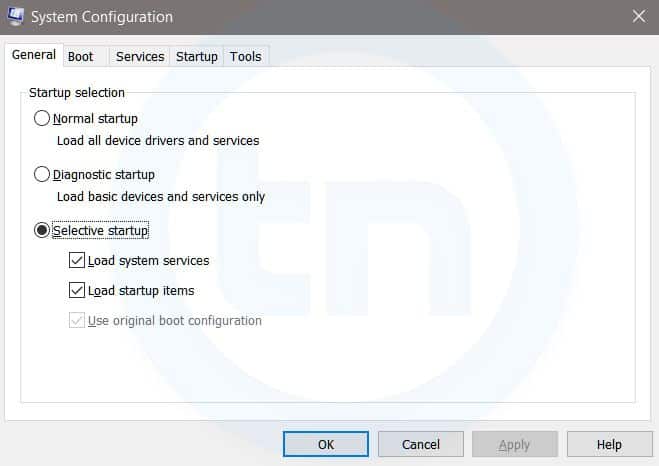
Windows System Configuration
This command will open Windows System Configuration where you can edit different things like the boot options, startup options, services, etc.
4. sysdm.cpl
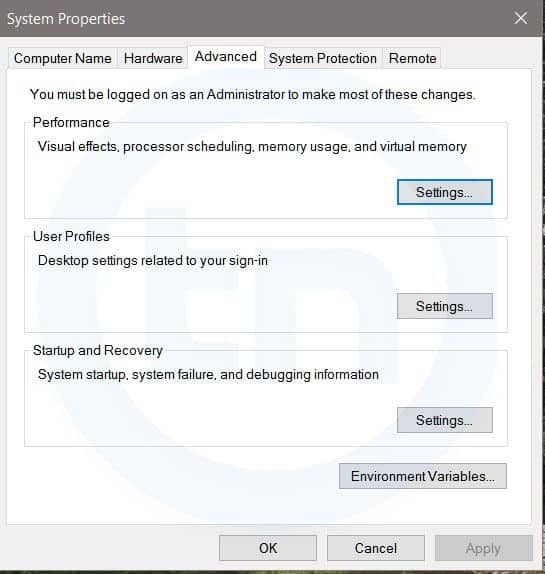
System Properties window
This command will open the System Properties window, Where you can change the system protection and performance related many settings
5. Powershell
Powershell is very similar the command prompt. Just type this command in the Run dialog box, and you will have your PowerShell opened without administrator privileges.
6. perfmon.msc
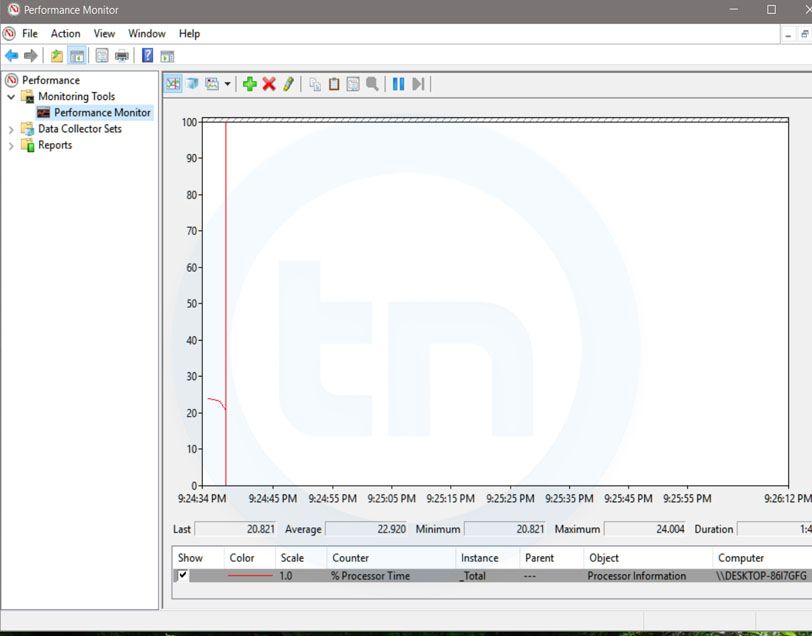
Windows System Performance monitor
This command can be used to monitor the performance of your computer. There are plenty of options for monitoring the system performance
7. regedit
Regedit Run command is used to open the Windows Registry. It is a hierarchical database that hosts all the configurations and settings of Windows operating system, it's users and the installed software.
8. \ (Backslash)
This is one of the lesser known Run commands. Just enter the backslash into the Run dialog box and it will open up the C drive. It is one of the quickest ways to access the C drive.
9. . (Dot)
This is yet another lesser known Run command. When executed, it opens the current user's home folder which hosts all the other local folders like the Downloads, Documents, Desktop, Pictures, etc.
10. .. (Double Dots)
When you execute these two dots in the Run dialog box, it will open up the Users folder which is located directly on the C drive
Also Read; Top 10 Great Gifts For Hackers
11. Control
This command will open the control panel. Control panel is used for managing all the system settings and programs
12. hdwwiz.cpl
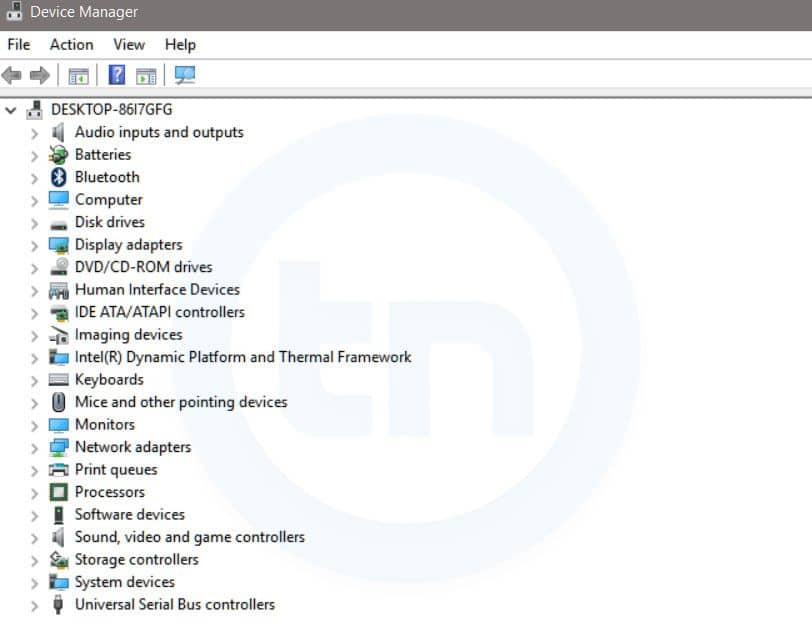
Windows Device Manager
This command is used to open the Device Manager in Windows. You can manage all the device connected internally or externally to your PC.
13. Notepad
The quickest way to open notepad in Windows. Just type this command in Run Box and hit enter.
14. osk
This command will open On-Screen Keyboard on your display monitor. You can easily touch and type or use your mouse for typing.
15. taskmgr
This command will open task manager where you can manage all the processes and programs running on Windows Operating system.
Related word
- Hacker Tools Hardware
- Nsa Hack Tools Download
- Hak5 Tools
- Hacker Tools Mac
- Pentest Tools
- Hacker Security Tools
- Growth Hacker Tools
- Pentest Tools Linux
- Pentest Tools Android
- Hack Tools For Games
- Pentest Box Tools Download
- Hacker Tools Free
- Hack Tools For Windows
- Hacker Tools
- Hacker Tools Online
- Physical Pentest Tools
- Pentest Tools Website Vulnerability
- Pentest Tools Kali Linux
- Hack Tools
- Pentest Tools Website
- Hacking Tools Hardware
- Hacks And Tools
- Hacking Tools For Beginners
- Hacker Tools Free Download
- Pentest Tools Online
- Hacking Tools Mac
- Hack Tools Mac
- Pentest Tools Apk
- Hacking Tools Windows 10
- Pentest Tools Nmap
- Pentest Tools Website Vulnerability
- How To Hack
- Best Hacking Tools 2019
- Hacker Hardware Tools
- Pentest Tools Open Source
- Game Hacking
- Bluetooth Hacking Tools Kali
- Best Hacking Tools 2019
- Pentest Tools Website
- Hacker Tools
- Tools For Hacker
- Hacking Tools For Windows
- Best Hacking Tools 2020
- Hack Tools For Pc
- Android Hack Tools Github
- Pentest Tools Website
- Hack Apps
- Hacker Tools For Pc
- Blackhat Hacker Tools
- Hacker Tools List
- Android Hack Tools Github
- Hacker Tools Github
- Game Hacking
- Hacking Tools Name
- Pentest Tools For Windows
- Hacker Tools For Windows
- Hack And Tools
- Hak5 Tools
- Hack App
- Hack Tools For Mac
- Pentest Automation Tools
- Pentest Recon Tools
- Install Pentest Tools Ubuntu
- Hacker Tools For Mac
- Hacker Tools For Pc
- Hacking Tools Download
- Hacker Tools Mac
- Growth Hacker Tools
- Tools For Hacker
- Hacker Tools For Pc
- Github Hacking Tools
- Pentest Tools Url Fuzzer
- Hacker Tools Apk Download
- Hacking Tools Free Download
- Hack Tool Apk
- Pentest Tools Github
- Hack Apps
- Hack Tools Pc
- Pentest Tools List
- Hacking Tools For Games
- Pentest Tools Open Source
- Pentest Tools Review
- Hack Tools Pc
- Hack Tools
- Hack Tools For Ubuntu
- Hacker Tools Windows
- Hacking Tools Kit
- Hacking Tools Mac
- Hacker Tools List
- Pentest Tools Alternative
- Pentest Tools For Mac
- Hacker Tools Software
- Hacker Security Tools
- What Are Hacking Tools
- Hack Tools 2019
- Hack Tools For Games
- Pentest Recon Tools
- Hack Tools
- Pentest Tools For Android
- Hacking Tools
- Top Pentest Tools
- Pentest Tools Find Subdomains
- Pentest Tools Windows
- Best Hacking Tools 2020
- Kik Hack Tools
- Hacking Tools Windows
- Hack Tools For Ubuntu
- How To Hack
- Pentest Tools For Ubuntu
- Hack And Tools
- Hacker Tools Hardware
- Pentest Tools Android
- Hacking Tools For Kali Linux
- Hacks And Tools
- Hacking Tools Hardware
- Hacking Tools Online
- Hacking Tools For Beginners
- Hacking Tools 2019
- Nsa Hack Tools
- Pentest Tools Nmap
- Hacker Tools Hardware
- Hacker Tools Apk

Tidak ada komentar:
Posting Komentar